OCR Challenge Lab
LiveEvery week there is a screenshot with something wrong in it. Find the bugs, rewrite them, and get a real score. The kind of bug a DOM test lets through.
Challenge of the Week
Week of 5 October 2026
The invoice for a US customer
You will practise: Currency symbol against the customer’s region
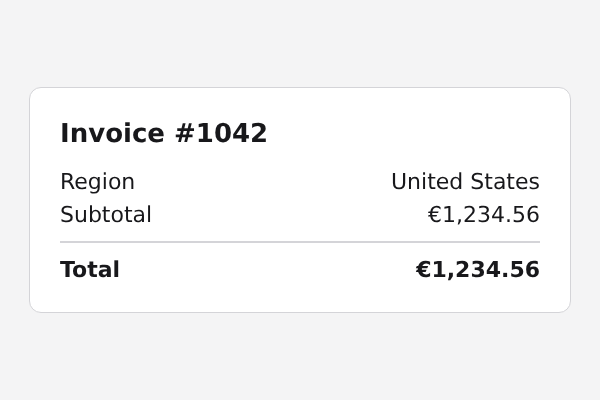
This invoice was generated for a customer in the United States. Find what is wrong, then rewrite it as it should read.
How It Works
- 1
Look at the screenshot
Read it the way a customer would. Add up the numbers. Check the dates against the country.
- 2
Name the bugs and rewrite them
Tick the kinds of bug you see, then type the text as it should read. Wrong guesses cost points.
- 3
See what a test would catch
You get a score, the reason for each bug and the one-line RenderCheck assertion that fails on it.
Grading runs in your browser and the answers are in the page, so this is practice, not a contest. Nothing you type is sent anywhere.
Practice
- easy
The invoice for a US customerThis week
Currency symbol against the customer’s region
- hard
A Swiss receipt in German
Locale date order, one currency per document, and sums
- hard
The Arabic welcome card
Right-to-left text and clipped boxes
Use RenderCheck in your tests
These challenges are practice. In production, RenderCheck runs the same checks in Playwright and Cypress, on your machine, with no upload.